 Dryforge
 GitHub
Docs
Dryforge Connect: Security Design
Introduction
End-to-end encryption is the banner most relay services fly. Few of the people who raise it could say what end-to-end encryption is. Their defects do not arrive from outside. They are made by the hands that build the product.
Security is built the way the rest of the product is built, assembled by AI from start to finish.
- Cryptography is whatever a search returns. No one asks whether the library has no stars or ten thousand, whether it was ever audited, or whether it follows any standard.
- Work a standard already does (the handshake, the framing, the rekeying) is written again by hand, often beside a library that already does it.
- Each new piece creates a case the design never anticipated, and each such case is closed with another piece.
The result ships as a secure service. Its weakness is not an accident someone finds later. It was there from the first line, put there by the way the product was made.
Connect solved this with an advanced architecture. Security was not added afterwards; it was settled first, as three decisions: which keys may exist where, how much the relay is trusted with, and what device trust rests on. What follows describes the structure those decisions produced, the properties that follow from it, and the two mechanisms that hold it in place: device enrollment and key custody.
1. The Dryforge Connect structure
A person's computers and the phones and browsers that reach them talk through a relay that is only a hop: it moves sealed packets between two devices and is not a party to any session.
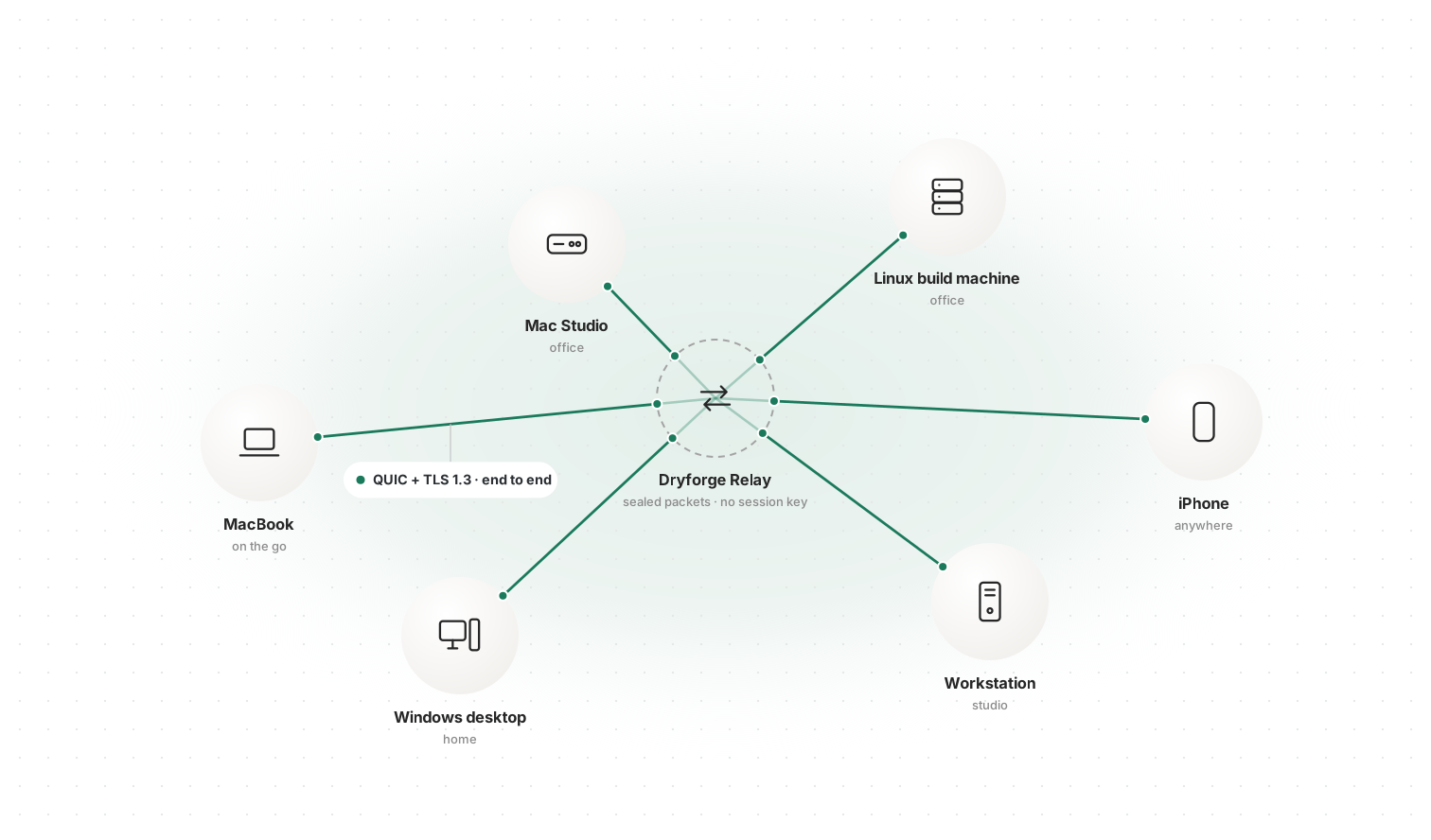
What a relay is for. Devices on different networks, behind NAT and firewalls, cannot reach each other directly. A relay gives every device one place to dial. In most designs that place also becomes the center of trust: it terminates the encryption, holds keys, stores messages or vouches for devices. Connect keeps the relay for reachability alone and gives it nothing else.
Outbound only. Every device dials out to the relay on port 443. No device listens for connections, so nothing needs a public address or NAT traversal, and Connect works on any network that allows HTTPS.
Two layers. The connection to the relay is a WebSocket (RFC 6455) over TLS; a computer speaks TLS 1.3 only on it and checks the relay's certificate against the public web roots. Inside it runs a second, independent layer. Each session between two devices is one QUIC connection (RFC 9000) whose handshake is TLS 1.3 (RFC 9001), run by the two devices themselves. Its packets travel inside the WebSocket messages; the relay terminates only the outer TLS and forwards the inner packets by path number without the keys to open them.
Computers serve, clients connect. In every session a computer is the TLS server, and a phone, a browser or another computer is the client. The computer's identity is its Ed25519 device key, and that is the key every client pins. A browser's identity key cannot be exported, so it cannot sign inside a TLS handshake; the client side is the one place where that does not matter, because the browser proves itself right after the handshake instead (step 5 below).
One set, many computers. A person's computers, whatever their kind, form one set. Any phone or browser admitted to the set can reach any computer in it, and computers reach each other the same way. Each computer keeps one socket open at the relay; a session to it starts there.
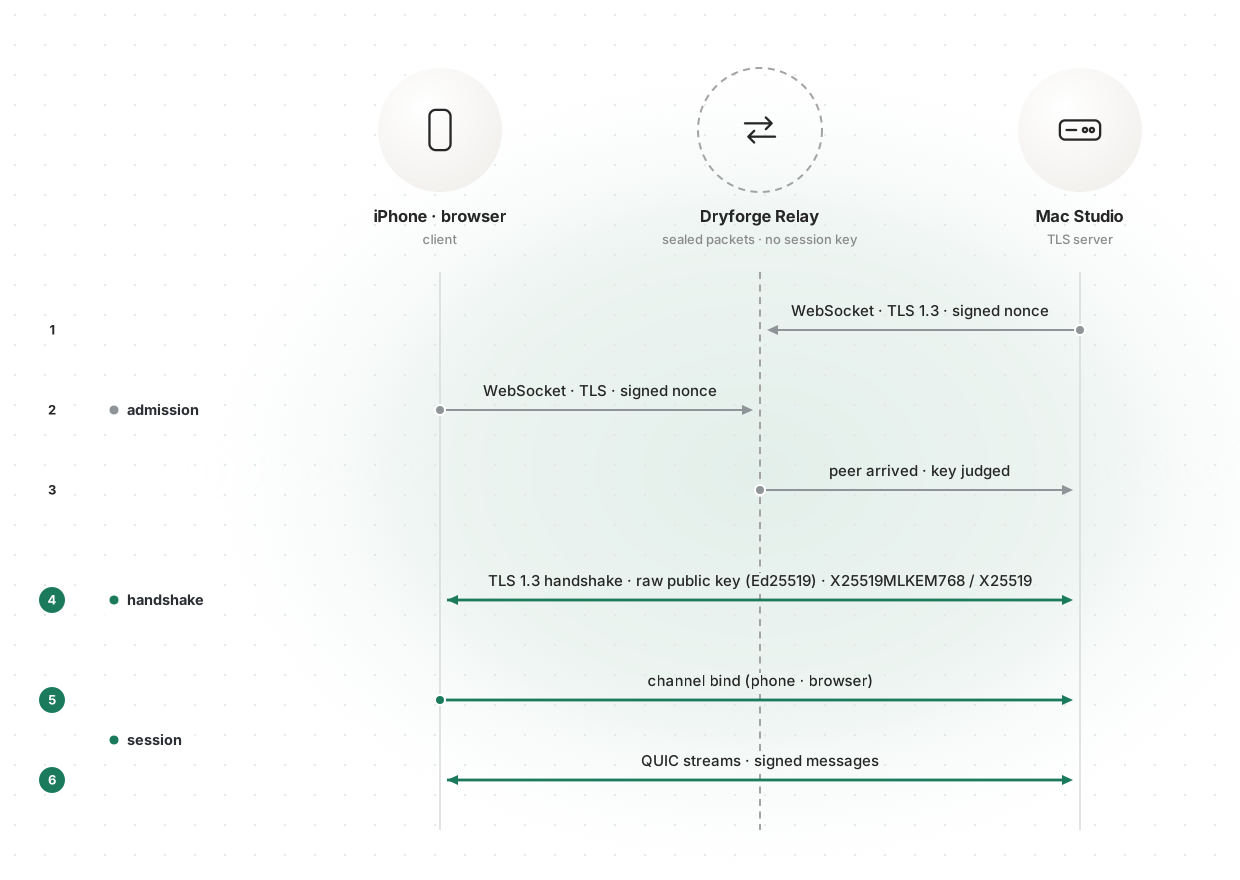
How a session starts.
-
WebSocket · TLS 1.3 · signed nonce. The computer opens its socket at the relay, signs the relay's fresh 32-byte nonce with its device key and shows an entitlement from the account service.
-
WebSocket · TLS · signed nonce. A client opens a socket toward that computer and does the same with a signed pass. Each answer is signed for its one socket and opens no other.
-
Peer arrived · key judged. The relay tells the computer which key has arrived. The computer decides, before any handshake, whether to talk to it.
-
TLS 1.3 handshake · raw public key (Ed25519) · X25519MLKEM768 / X25519. The client and the computer run the TLS 1.3 handshake inside QUIC, agreeing keys with X25519MLKEM768 between computers and X25519 with phones and browsers. The computer presents its device key as a raw public key (RFC 7250), with no certificate, chain, hostname or expiry, and proves possession with an Ed25519 CertificateVerify; the client accepts only a key that matches, byte for byte, the one it holds for that computer.
-
Channel bind (phone · browser). A phone or browser then binds its identity to the connection: within five seconds its non-exportable P-256 key signs the connection's TLS exporter value (RFC 9266). The exporter is unique to this TLS connection and known only to its two ends.
-
QUIC streams · signed messages. The session runs on QUIC streams. Messages that carry the person's authority are signed by the sending device (section 4).
2. Properties of the structure
Each property below follows from where the keys are and what the relay is; none depends on code added to catch a case.
The relay holds nothing worth taking. Session keys are derived by the two endpoints in their own TLS 1.3 handshake and exist only in their memory. The relay never takes part in that handshake, so it never has a session key, and what passes through it is ciphertext. It keeps no storage for sessions: socket state lives in memory alongside the socket, the relay's database holds nothing about a device, an account or an address, and request logging is off. Dryforge's servers store none of the person's work, encrypted or not.
The relay cannot insert a party. A client accepts only the computer key it pinned, and no certificate authority, account service or relay operator can issue anything it will accept in that key's place. A computer accepts another computer only by its pinned key, and a phone or browser only through a bind signed for that exact connection; a bind made on one connection is worthless on any other, because no other connection has the same exporter value. The relay's admission step keeps strangers away but grants nothing; whether a key may talk is decided by the computer.
There is nothing to downgrade to. Between computers, key agreement is X25519MLKEM768 (RFC 10024), the hybrid of X25519 and ML-KEM-768 (FIPS 203), and it is the only group either side offers. A client that offers anything less finds no group in common and the handshake fails. The hybrid keeps a session secret as long as either component holds, which protects recorded traffic against a future quantum adversary. Phones and browsers agree keys with X25519.
Every session stands alone. Every connection runs a full TLS 1.3 handshake with a fresh key exchange. There is no session resumption, no 0-RTT data and no session ticket, so nothing that could reopen a session outlives it, and the compromise of one session's keys says nothing about another's.
Networks can change under a session. A connection is identified by its keys and QUIC connection IDs, never by the socket it arrives on. When a phone moves from Wi-Fi to cellular and returns to the relay on a new socket, QUIC validates the new path and the connection moves onto it with its keys and streams intact, without a new handshake. An address proves nothing; only the handshake keys say who is at the other end.
3. Device enrollment
The signed device record decides which keys belong to the person; a device joins it only when the person compares fingerprints and a computer already in the set signs the admission.
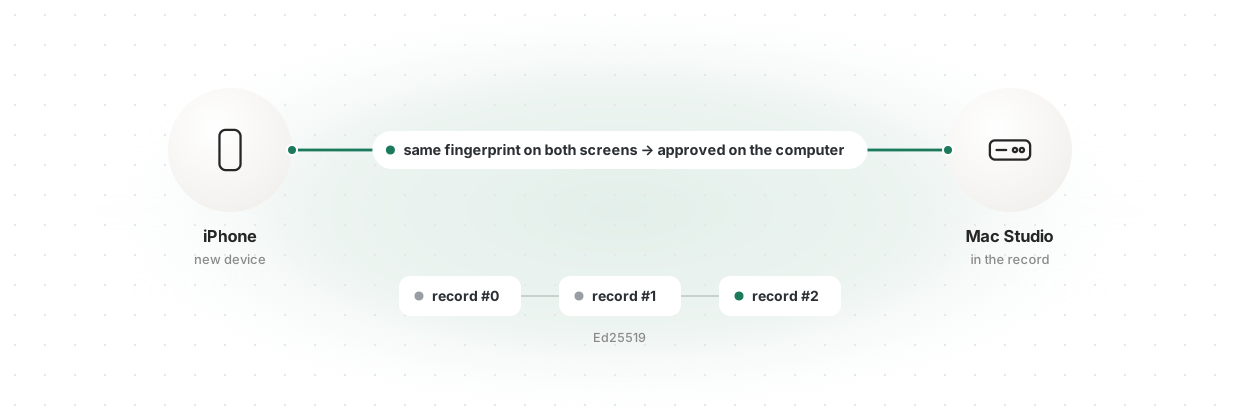
The set is defined by a device record: a chain that begins with a genesis signed by the first computer, in which each change admits or removes one key, names the change before it, and is signed with Ed25519 by a computer already in the set, as a COSE_Sign1 structure (RFC 9052). Phones and browsers are members but never sign. The account service stores the chain and keeps a list of the account's keys, but the list grants nothing and the service cannot sign a change.
A new device signs in, reaches a computer already in the record, and both screens show the fingerprints of both keys: six groups of five digits each, drawn from a SHA-512 hash, about 99.7 bits. The person compares them and approves on the computer, which signs the admission. Each key is compared on its own line. A single short code over both keys would give an attacker in the middle a target small enough to search for; matching a key's own fingerprint takes about 2^99.7 attempts. There is no pairing code, shared secret or QR code carrying a key.
Every device verifies the chain from its genesis, refuses one that falls behind or forks from its own, and compares the latest record with its peer whenever a session opens. The service can remove a key from its list; it cannot add one to the set.
4. Key custody
Private keys stay in the process or browser that holds them, apart from the code that faces the network, and every message carrying the person's authority is signed by the device that sent it.
A computer's device key lives in a separate vault process. The vault builds every statement it signs: for a handshake it receives only the transcript hash and constructs the CertificateVerify input itself (RFC 8446 §4.4.3); for the relay's challenge it receives only the nonce and the socket it is for. A browser's identity key is generated non-extractable by Web Cryptography.
The link process that runs QUIC and TLS and parses every byte a peer sends holds no key and opens no socket of its own. A message that carries the person's authority (their words, an approval, a key press) is signed by the sending device's identity key over a fixed 104-byte statement: the session, the channel, a strictly increasing sequence number and the SHA-256 of the payload. The engine checks the length, session, sequence and signature in that order before reading the payload, so even the process that terminates TLS cannot forge such a message, replay it, or move it to another channel.
5. Standards
- Transport: QUIC version 1 (RFC 9000) with TLS 1.3 (RFC 8446, RFC 9001) end to end; WebSocket (RFC 6455) over TLS to the relay, TLS 1.3 only from a computer.
- Key agreement: X25519MLKEM768 (RFC 10024; ML-KEM-768, FIPS 203) between computers; X25519 (RFC 7748) with phones and browsers.
- Authenticated encryption: ChaCha20-Poly1305 (RFC 8439) or AES-128-GCM (NIST SP 800-38D), with HKDF-SHA-256 (RFC 5869) as TLS 1.3 specifies.
- Signatures: Ed25519 (RFC 8032) for device keys and the device record; ECDSA P-256 with SHA-256 (FIPS 186-5) for browser identities.
- Peer authentication: pinned raw public keys (RFC 7250); channel binding through the TLS exporter (RFC 9266).
- Signed records: COSE_Sign1 (RFC 9052). Hashes: SHA-256 and SHA-512 (FIPS 180-4).